The test plan outlines functionality testing of the Graphiant Network Services in support of customer’s business requirements and its service offerings. Graphiant provides a private global wide area network that allows customers to establish SLA based any-to-any encrypted edge connectivity, private connectivity to cloud, and business to business network over a private, massively scalable stateless data plane, with highly available control and management delivered as a service.
Equipment / Bill of Materials
Quantity | Platform | Notes |
|---|---|---|
6 | Lanner 1515B or Dell VEP | |
1 | VM GNOS image | |
1 | Graphiant Portal | |
2 (mininum) | Internet DIA circuits | DHCP and/or Static |
2 | WAN routers | BGP |
2 | L3 Switches | BGP |
1 | WAN Emultor | Ability to inject packet loss/latency/jitter |
6 | Hosts / VMs | VM/hosts for testing; iPerf3 |
1 | Syslog server | Syslog reciever |
1 | IPFIX server | IPFIX flow receiver |
1 | Azure account | Azure VNET testing (optional) |
Logical Topology
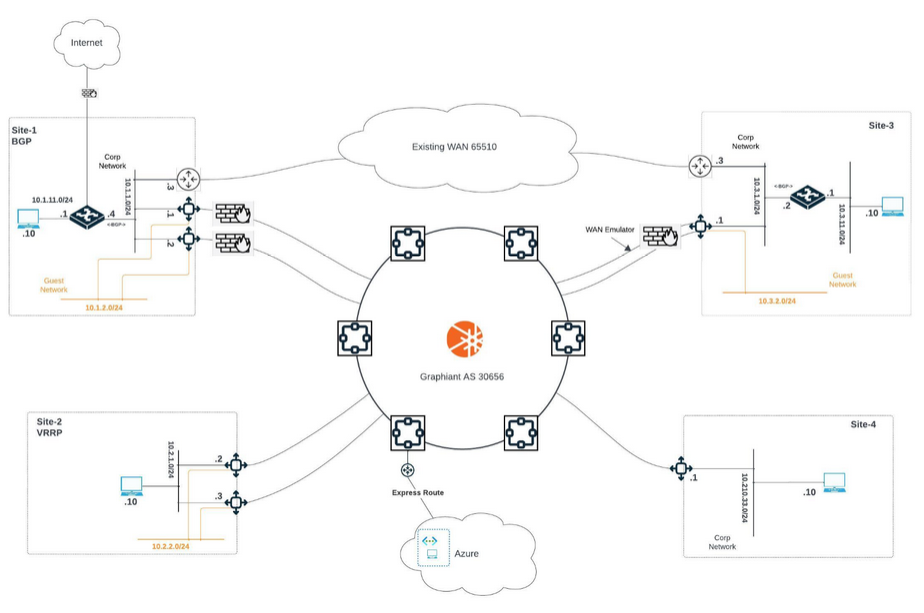
Test Plan Details:
These tables are here for your convenience:
Please feel free to copy them for documenting data during testing.
Device Onboarding via DHCP to Graphiant Service
VM Edge bring-up and on-boarding
Test No. 1 | Location: | Performed By: | Date: |
|---|---|---|---|
Hostnames: | |||
Test Purpose: | Validate device bring-up and on-boarding to Graphiant Network | ||
Procedure: |
| ||
Passed: | |||
Failed: | |||
Reason for Failure: | |||
Remarks and notes: | |||
Device Onboarding with Static IP to Graphiant Service
Edge bring-up and on-boarding
Test No. 1.5 | Location: | Performed By: | Date: |
|---|---|---|---|
Hostnames: | |||
Test Purpose: | Validate device bring-up and on-boarding to Graphiant Network | ||
Procedure: |
| ||
Passed: | |||
Failed: | |||
Reason for Failure: | |||
Remarks and notes: | |||
Edge Device One-Touch Upgrade
Test No. 2 | Location: | Performed By: | Date: |
|---|---|---|---|
Hostnames: | |||
Test Purpose: | Graphiant Edges can be upgraded ad hoc or scheduled through the Graphiant portal. This test demonstrates the upgrade process | ||
Procedure: |
| ||
Passed: | |||
Failed: | |||
Reason for Failure: | |||
Remarks and notes: | |||
Device Base Configuration
Edge basic configuration through Graphiant portal
Test No. 3 | Location: | Performed By: | Date: |
|---|---|---|---|
Hostnames: | |||
Test Purpose: | Configure basic device information and connectivity on all platforms from Graphiant portal | ||
Procedure: |
| ||
Passed: | |||
Failed: | |||
Reason for Failure: | |||
Remarks and notes: | |||
Edge Redundancy Options
Configure BGP
Test No. 4 | Location: | Performed By: | Date: |
|---|---|---|---|
Hostnames: | |||
Test Purpose: | Graphiant network can establish BGP routing with third party routers and L3 switches, and automatically redistribute this routing information across the Graphiant control plane for sites on the same LAN Segment. This test verifies that all learned BGP routes are propagated, and networks are visible and reachable. | ||
Procedure: |
| ||
Passed: | |||
Failed: | |||
Reason for Failure: | |||
Remarks and notes: | |||
Configure VRRP
Test No. 5 | Location: | Performed By: | Date: |
|---|---|---|---|
Hostnames: | |||
Test Purpose: | Use Graphiant edges as both primary and secondary devices for the site with VRRP. | ||
Procedure: |
| ||
Passed: | |||
Failed: | |||
Reason for Failure: | |||
Remarks and notes: | |||
Validation of Topology and Baseline
Record routing and reachability information from all sites
Test No. 6 | Location: | Peformed By: | Date: |
|---|---|---|---|
Hostnames: | |||
Test Purpose: | Graphiant network automatically passes routing information for connected networks between all sites if they are on the same LAN Segment. This test verifies that all configured networks and interfaces are visible and reachable as expected. | ||
Procedure: |
| ||
Passed: | |||
Failed: | |||
Reason for Failure: | |||
Remarks and notes: | |||
Configure and Test Edge Services
Configure and Test DHCP Server
Test No. 7 | Location: | Performed By: | Date: |
|---|---|---|---|
Hostnames: | |||
Test Purpose: | Graphiant Edge at site-3 to be a DHCP server on guest LAN segment. | ||
Procedure: |
| ||
Passed: | |||
Failed: | |||
Reason for Failure: | |||
Remarks and notes: | |||
Configure and Test Syslog Service
Test No. 8 | Location: | Performed By: | Date: |
|---|---|---|---|
Hostnames: | |||
Test Purpose: | Graphiant Edge can send Syslogs to any server in the customer environment that is listening for logs. | ||
Procedure: |
| ||
Passed: | |||
Failed: | |||
Reason for Failure: | |||
Remarks and notes: | |||
Configure and Test IPFIX Service
Test No. 9 | Location: | Performed By: | Date: |
|---|---|---|---|
Hostnames: | |||
Test Purpose: | Graphiant Edge can send IPFIX flow records to third party IPFIX server in the customer environment that is listening for logs. | ||
Procedure: |
| ||
Passed: | |||
Failed: | |||
Reason for Failure: | |||
Remarks and notes: | |||
Traffic Tests
Run iPerf and Browser Applications Between Sites 1 & 3
Test No. 10 | Location: | Performed By: | Date: |
|---|---|---|---|
Hostnames: | |||
Test Purpose: | Run various applications between sites 1 & 3. | ||
Procedure: | Bring up iPerf/TCP test at hosts in site-1 and site-3. Set up iperf server in Site 1. Use iperf clients at Site 3 to emulate udp and tcp traffic. Use Browser on host at site-3 and make sure they can get to internet via site-1 (default exit).\ See https://iperf.fr/iperf-doc.php for additional assistance with iPerf. | ||
Passed: | |||
Failed: | |||
Reason for Failure: | |||
Remarks and notes: | |||
Traffic Policies
Test No. 11 | Location: | Performed By: | Date: |
|---|---|---|---|
Hostnames: | |||
Test Purpose: | Create traffic policies at site 3 to select between circuits on which to put specific traffic. | ||
Procedure: | Create traffic policy to pin iPerf traffic to circuit-1 .Create traffic policy to pin ICMP traffic to circuit-1. Create traffic policy to pin YouTube traffic to circuit-2. Create traffic policy to pin a specific traffic from 10.3.11.10 to circuit-2. Assign the traffic class of “Gold”. Allow all other traffic as Default. Run traffic and review traffic in Monitoring. | ||
Passed: | |||
Failed: | |||
Reason for Failure: | |||
Remarks and notes: | |||
Hierarchical Tagging and Route Policies
Test No. 12 | Location: | Performed By: | Date: |
|---|---|---|---|
Hostnames: | |||
Test Purpose: | Utilize site tagging mechanism for route policies to prefer the same routes being advertised from multiple locations. This is often needed for route/site redundancies purposes. | ||
Procedure: | Create site tags for all sites. Advertise same IP prefix from site 1 and site 3 towards sites 2 and 4. Use route policy to have site 2 prefer site 1, and site 4 prefer site 3. To test redundancy, make the prefix unavailable from site 1, site 2 should then use site 3 to reach the prefix. | ||
Passed: | |||
Failed: | |||
Reason for Failure: | |||
Remarks and notes: | |||
BGP Native Best Path Selection
Test No. 13 | Location: | Performed By: | Date: |
|---|---|---|---|
Hostnames: | |||
Test Purpose: | Utilize Graphiant ASN in AS-Path to allow remote edges to access site-1 and site-3 for best path. | ||
Procedure: | The Graphiant stateless core service uses the registered ASN of 30656 and this ASN is added to all routes going through the core.
| ||
Passed: | |||
Failed: | |||
Reason for Failure: | |||
Remarks and notes: | |||
WAN Impairment and Visibility
Test No. 14 | Location: | Performed By: | Date: |
|---|---|---|---|
Hostnames: | |||
Test Purpose: | Create traffic policies at site3 for primary and secondary circuits, impair primary circuit out of SLA and observe traffic failover to secondary. | ||
Procedure: | Impair circuit-1 such that it can no longer sustain any traffic. Verify traffic fails over to circuit-2. Navigate on portal to Monitor for Edge-1 and record screens:
| ||
Passed: | |||
Failed: | |||
Reason for Failure: | |||
Remarks and notes: | |||
SLA Routing
Preferred Path Based on Policy
Test No. 15 | Location: | Performed By: | Date: |
|---|---|---|---|
Hostnames: | |||
Test Purpose: | Create policy for traffic to take latent path (Gold). | ||
Procedure: |
| ||
Passed: | |||
Failed: | |||
Reason for Failure: | |||
Remarks and notes: | |||
Path Change on WAN Latency Change
Test No. 16 | Location: | Performed By: | Date: |
|---|---|---|---|
Hostnames: | |||
Test Purpose: | Observe traffic changes path based on changes in WAN latency. | ||
Procedure: |
| ||
Passed: | |||
Failed: | |||
Reason for Failure: | |||
Remarks and notes: | |||
Maintenance Mode (Hitless Service Mode)
Maintenance Mode
Test No. 17 | Location: | Performed By: | Date: |
|---|---|---|---|
Hostnames: | |||
Test Purpose: | In a highly available network, uptime is paramount. Therefore, it’s important to have the ability to service sites with redundant nodes without introducing down time. | ||
Procedure: | Schedule site 2 devices for an upgrade. Start icmp/iperf streams from site 2 host to site 1 host. Observe that one device will enter "maintenance mode" while the other is still active. Traffic should use the "active" device. Once upgrade is complete, second device will enter "maintenance mode". Observe the switchover. | ||
Passed: | |||
Failed: | |||
Reason for Failure: | |||
Remarks and notes: | |||
Monitoring and Troubleshooting
Monitoring
Test No. 18 | Location: | Performed By: | Date: |
|---|---|---|---|
Hostnames: | |||
Test Purpose: | There are multiple visibility tools in the monitor section. This test is to record some of these screens. | ||
Procedure: | Navigate on portal to Monitor for Edge-1 and record screens:
| ||
Passed: | |||
Failed: | |||
Reason for Failure: | |||
Remarks and notes: | |||
Troubleshooting
Test No. 19 | Location: | Performed By: | Date: |
|---|---|---|---|
Hostnames: | |||
Test Purpose: | There are currently 5 tools under troubleshooting: Ping, Traceroute, Throughput Test, Packet Capture, and Diagnostic Reports. This test is to verify all are working as required. | ||
Procedure: |
| ||
Passed: | |||
Failed: | |||
Reason for Failure: | |||
Remarks and notes: | |||
Failure Scenarios
WAN Path Failover to Graphiant
Test No. 20 | Location: | Performed By: | Date: |
|---|---|---|---|
Hostnames: | |||
Test Purpose: | In this scenario, the traffic is going over the traditional WAN path between site-1 and site-3 over third-party routers. The traffic prefers this path because the BGP attributes is more attractive. The Graphiant Edges are also learning the routes between the sites and will only pass traffic between the sites when there’s a failure scenario on the legacy WAN | ||
Procedure: |
| ||
Passed: | |||
Failed: | |||
Reason for Failure: | |||
Remarks and notes: | |||
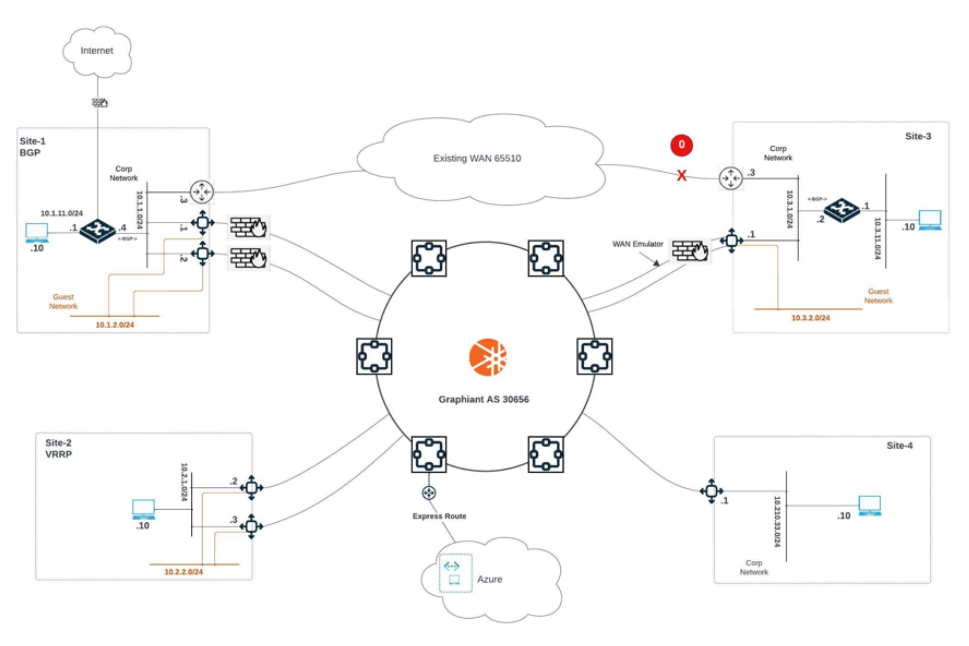
Edge HA Tests with Edge Redundancy
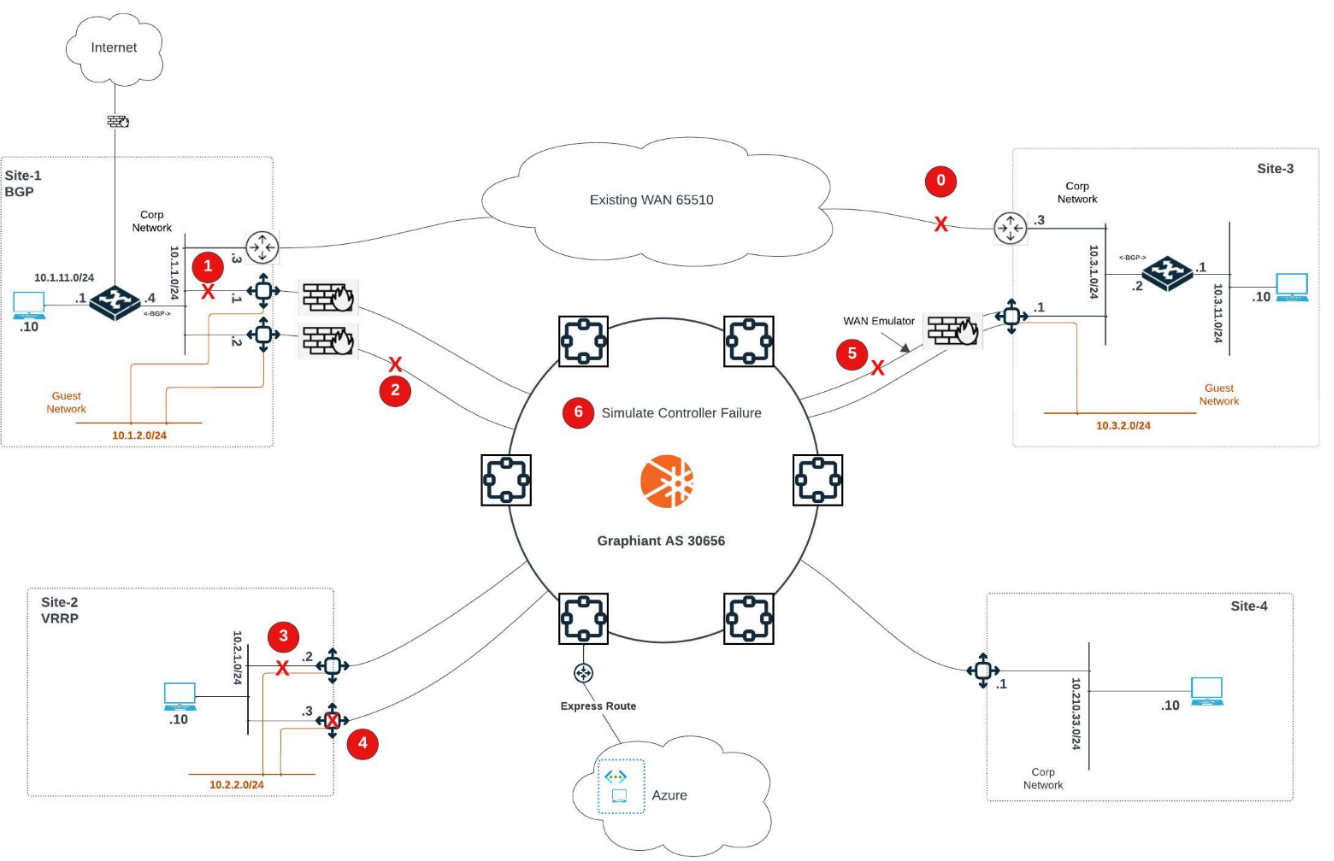
LAN Failure Edge A – Site-1 with BGP
Test No. HA 1 | Location: | Performed By: | Date: |
|---|---|---|---|
Hostnames: | |||
Test Purpose: | Direct Failure Edge-B LAN eth5 site-1 (BGP – Edge-B is primary local). | ||
Procedure: |
| ||
Passed: | |||
Failed: | |||
Reason for Failure: | |||
Remarks and notes: | |||
WAN Failure Edge A – Site-1 with BGP
Test No. HA 2 | Location: | Performed By: | Date: |
|---|---|---|---|
Hostnames: | |||
Test Purpose: | Edge-A site-1 WAN Failure (BGP – Edge-A is primary local). | ||
Procedure: |
| ||
Passed: | |||
Failed: | |||
Reason for Failure: | |||
Remarks and notes: | |||
Edge A – Site-2 with VRRP Fail LAN Interface
Test No. HA 3 | Location: | Performed By: | Date: |
|---|---|---|---|
Hostnames: | |||
Test Purpose: | Failure of Edge-A site-2 Corp (VRRP – Edge-A is primary local). | ||
Procedure: |
| ||
Passed: | |||
Failed: | |||
Reason for Failure: | |||
Remarks and notes: | |||
WAN Failure Edge B – Site-2 with VRRP
Test No. HA 4 | Location: | Perfomed By: | Date: |
|---|---|---|---|
Hostnames: | |||
Test Purpose: | Fail Edge-B (VRRP – Edge-B is primary for Guest segment). | ||
Procedure: |
| ||
Passed: | |||
Failed: | |||
Reason for Failure: | |||
Remarks and notes: | |||
WAN A Failure – Site-3
Test No. HA 5 | Location: | Performed By: | Date: |
|---|---|---|---|
Hostnames: | |||
Test Purpose: | WAN circuit failure Edge site-3. | ||
Procedure: |
| ||
Passed: | |||
Failed: | |||
Reason for Failure: | |||
Remarks and notes: | |||
Controller Failure – Simulate for Site-1
Test No. Ha 6 | Location: | Performed By: | Date: |
|---|---|---|---|
Hostnames: | |||
Test Purpose: | Simulate single controller failure for site-1. | ||
Procedure: |
| ||
Passed: | |||
Failed: | |||
Reason for Failure: | |||
Remarks and notes: | |||