How Graphiant upgrades its management, control, and data planes with no customer impact — and how you can track it.
Overview
Graphiant continuously improves the service with regular software upgrades — and does so without interrupting your traffic. Upgrades roll out in canary mode: every change is proven on a small footprint, soaked with real traffic, then rolled out gradually — region by region, during local off-hours — always keeping a redundant path in service.
Graphiant delivers velocity and quality together. New features and fixes arrive on a fast, continuous cadence, while every upgrade is engineered so that reliability is never traded for speed. Your network continues to operate at full performance throughout. Delivering improvements rapidly is only part of the objective; delivering them safely, every time, is the standard to which Graphiant holds itself.
This document explains, at a high level, how each layer of the Graphiant service is upgraded with zero customer impact, how quality is proven before anything reaches you, and where you can follow upgrade status.
.png)
The Three Planes
Graphiant's architecture separates into three independent planes, so work on one never stops the others.
Management plane — GCS: The cloud management services — portal, APIs, configuration, and telemetry.
Control plane — Tunnel Terminators (T2s) / ODP Servers (ODPs): Routing, policy distribution, and control-session termination for edges and gateways.
Data plane — Backbone (Stateless Core) & Edge Terminators (ETs): Carries your encrypted overlay traffic between Graphiant's global points of presence (PoPs).
Because the planes are decoupled, your traffic keeps flowing even while the management services are being updated.
.png)
How Upgrades Are Rolled Out
Graphiant upgrades the infrastructure it manages on a predictable, staggered schedule, always keeping the cloud services, control-plane nodes, and backbone current:
GCS (Management plane): upgraded and promoted on a rolling basis, keeping the cloud services current continuously.
T2s / ODPs (Control plane) and ETs (Backbone / Data plane): the infrastructure nodes carry live traffic, so they follow a more conservative process, upgraded on a staggered schedule.
GNOS software releases (Edges / Gateways): Graphiant publishes new GNOS releases and keeps the Latest, Recommended, and Stable version designations up to date, but applying them to your Edges and Gateways is in your control — you choose when and to which release to upgrade (see below section “Customer Edges (CPEs)“ to choose a channel).
Off-cycle hot-fixes: when a security patch or bug fix warrants it based on impact, Graphiant ships it off-cycle, as early as possible (typically within days), across whichever planes are affected. You never have to wait for the next scheduled window for a critical fix.
This combines a steady, planned process with the ability to respond rapidly when required, delivering both quality and velocity.
How Each Layer Stays Hitless
Every layer is built with redundancy, so a component can be taken out of service and upgraded while its peers continue to serve. The management plane (GCS) and the control plane (T2s and ODPs) are both fully redundant, and the data-plane backbone is protected as described in below section “Backbone Upgrades: Zero Outages by Design““.
.png)
Management plane (GCS)
GCS is a microservices-based cloud platform engineered for high availability: its services run as redundant, horizontally scaled instances that auto-scale with load, so individual instances can be updated or replaced with no loss of service. GCS is upgraded as a rolling update of these services, with online database migrations. Because the services are redundant — and because the control and data planes operate independently — your traffic and existing sessions are unaffected; only new configuration changes and telemetry briefly pause while the update completes.
Control plane (T2s / ODPs)
Control-plane nodes (T2s and ODPs) are deployed in redundant pairs. Graphiant places the standby member into maintenance mode — so it draws no live control traffic — then upgrades and verifies it, before doing the same for the primary. Edges and gateways maintain dual control connectivity with no split-brain, so control sessions simply re-home to the healthy member — with no impact to forwarding.
Data plane (Backbone & ETs)
The backbone receives the most conservative, fully hitless treatment. See below section “Backbone Upgrades: Zero Outages by Design“.
Backbone Upgrades: Zero Outages by Design
The backbone carries your live, encrypted traffic between Graphiant's global points of presence (PoPs), so it receives the most conservative treatment of all. Backbone upgrades are engineered to be completely hitless — no dropped sessions and no traffic loss.
Redundant Edge Terminators. Every PoP is built with at least two Edge Terminators (ETs) — a primary and a secondary — each sized to carry the site's full load. Your overlay/IPsec tunnels are anchored across both at all times.
Resilience beyond the PoP. Redundancy is not limited to a single site. In the rare event that an entire PoP becomes unavailable, connected Edges automatically fail over to a neighboring PoP, preserving connectivity even during a full-site outage.
One ET at a time — the partner always carries traffic. For each PoP, Graphiant:
a. Places the backup (secondary) ET into maintenance mode so it attracts no traffic, drains it, and upgrades it while 100% of traffic rides the primary.
b. Brings the upgraded backup out of maintenance mode and verifies health — tunnels re-established, forwarding correct, telemetry flowing.
c. Repeats for the primary ET, with traffic now carried by the freshly upgraded backup.
By always upgrading the backup first and the primary second — never both at the same time — a fully in-service terminator carries the site's traffic at every moment. Because a healthy ET is always in service and tunnels reconverge onto it in sub-second time, there is no maintenance outage — your traffic simply stays on the in-service terminator throughout.
Follow-the-sun across time zones. Graphiant's PoPs span the globe, so each PoP is scheduled to upgrade during its own region's local night / off-peak hours (roughly evening to early morning local time) — deliberately avoiding that region's business day so customers are never disrupted during their working hours. Because Graphiant's teams follow the sun, engineers perform each region's upgrade within their own normal working hours while the customers served by that PoP are outside theirs. Regions are upgraded one batch at a time across multiple days, never the entire backbone at once.
Proven before it ships (canary soak). The backbone image is first run as a canary on a small footprint and soaked with real traffic across a full weekend. Only a healthy, soaked image is promoted to the wider backbone.
Verified at every hop. Automated health and smoke checks run between every ET and every region, and the rollout advances only when the previous step is confirmed clean. Any firmware/BIOS update that ships with a core refresh follows the same one-at-a-time, partner-protected pattern.
Result: backbone software and firmware are refreshed continuously with zero customer-visible downtime; sessions remain established from start to finish.
See "Graphiant Network Connectivity Regions": https://docs.graphiant.com/docs/graphiant-network-connectivity-regions
.png)
.jpg)
Canary Soak — Graphiant Runs on Graphiant
Before any broad rollout, each new image is deployed to a small canary footprint and soaked with real traffic — including across a full weekend — so that any regression is identified on a small, controlled footprint first.
That canary footprint is Graphiant's own network. Graphiant operates its corporate network (Corpnet) on the platform and upgrades it to each new image first, allowing it to soak with real production traffic before any customer PoP is upgraded. A release that Graphiant does not trust with its own traffic is not released to customers.
.png)
Proven by an Automated CI/CD Quality Pipeline
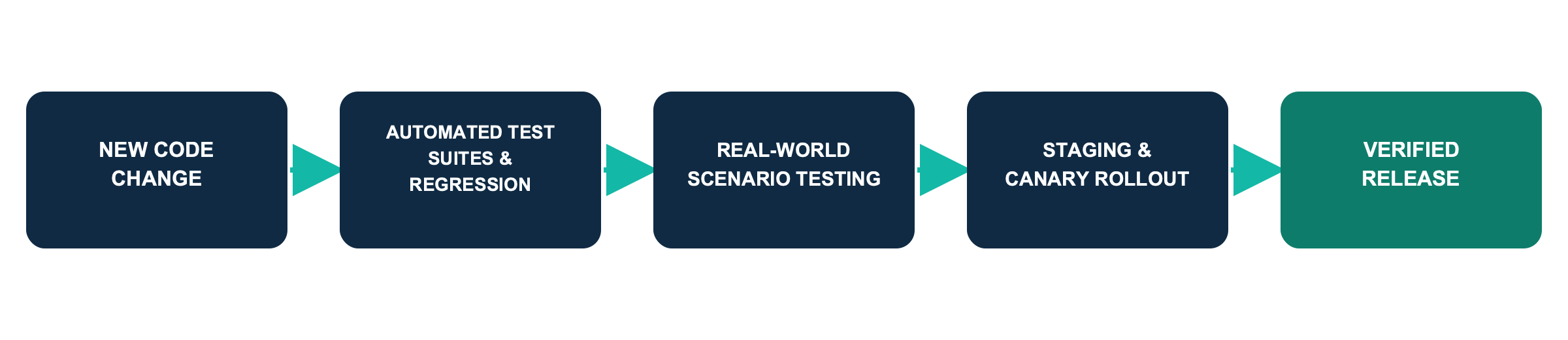
Quality at Graphiant is enforced by a pipeline rather than a checklist: changes are promoted on evidence, not assumption. Every change passes through a series of automated quality gates continuously, on every commit, and then progresses through a sequence of environments, each more stringent than the last — a full nightly regression pass, a period in staging, and finally a small, closely monitored canary release in production — before reaching the broader customer base. Promotion between stages, and the checks that gate each step, are fully scheduled and automated.
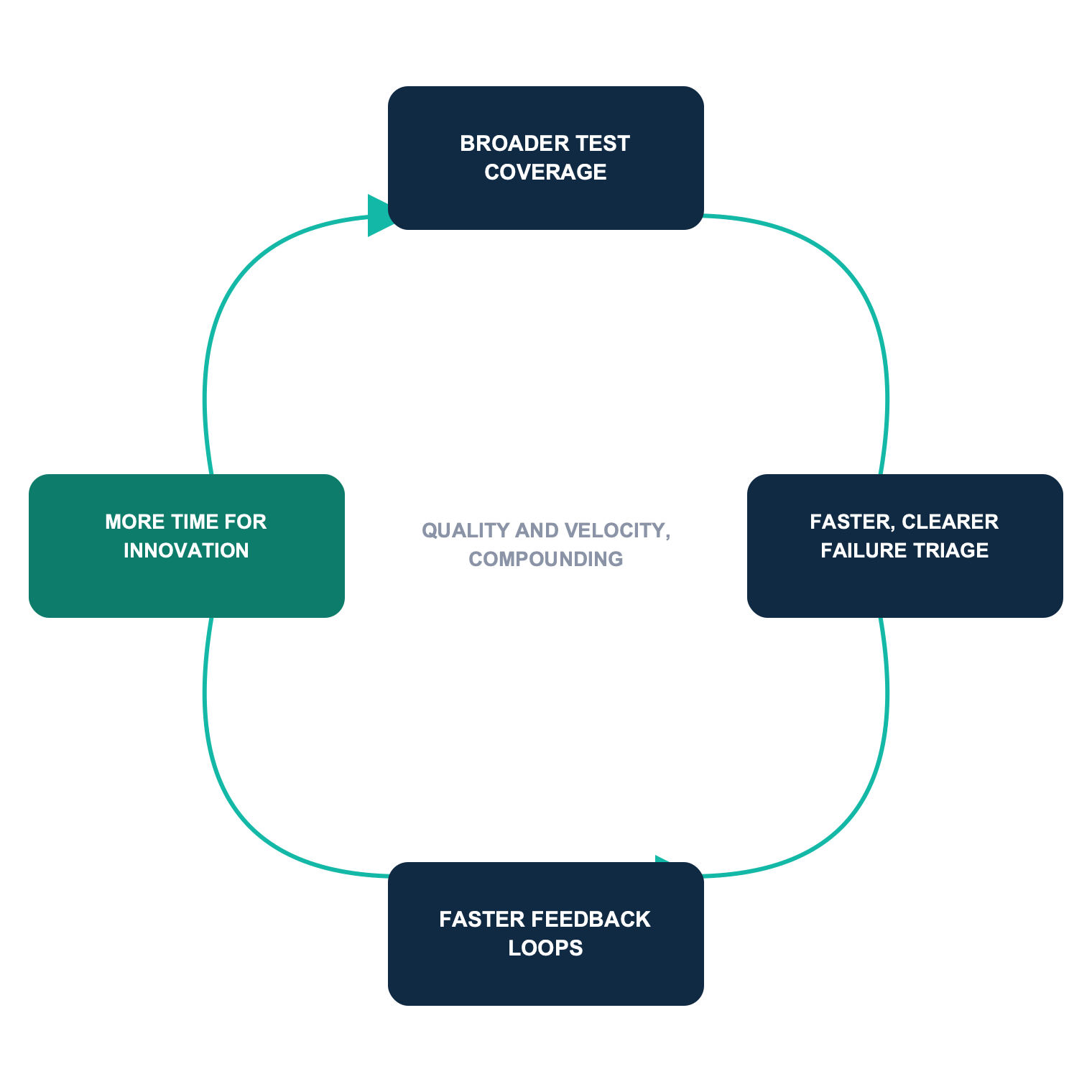
AI agents strengthen this process further by generating real-world test scenarios daily (brownouts, failovers, congestion, security rekeys, and software upgrades) and systematically detecting intermittent defects (race conditions, resource spikes and leaks, and crashes across distributed devices and services) that would otherwise remain hidden.
Each upgrade phase is gated by automated health and smoke tests plus before-and-after monitoring comparisons; the next phase begins only once the previous one is confirmed healthy. Release readiness is tracked with clear channels — Latest, Recommended, and Stable — so you always know the promotion state of a given version.
Read more — "When the Network Cannot Fail: How Graphiant Uses AI Agents to Raise the Bar on Quality and Velocity": https://www.graphiant.com/resources/when-the-network-cannot-fail-how-graphiant-uses-ai-agents-to-raise-the-bar-on-quality-and-velocity
Customer Edges (CPEs)
The upgrades described above cover the Graphiant-managed infrastructure — Graphiant performs those for you with no customer impact. Your own Edges (CPEs) are different: you decide when and to which release they upgrade, on your own schedule.
Choose your Release Channel
Graphiant follows a rolling release cadence with overlapping support, so you can upgrade at your convenience:
Latest: the newest features; released monthly (short-term support, ~2 months).
Recommended: hardened for a month before promotion; released roughly quarterly (~6 months support).
Stable: long-term release; issued about once a year (12 months support).
See "Software Release Information for Service Upgrades": https://docs.graphiant.com/docs/software-release-information-for-service-upgrades
Stay on a Supported Release
Each release eventually reaches End of Maintenance (EOM — spot-fixes only) and then End of Life (EOL — no fixes). Plan your Edge upgrades to stay ahead of EOL.
See "Software End of Maintenance and End of Life Information": https://docs.graphiant.com/docs/software-end-of-maintenance-and-end-of-life-information
Manage and Schedule from the Portal
In the Graphiant Portal, go to Maintain > Device Lifecycle to:
See the state of every Edge — Activated, Staging, Maintenance, Scheduled Upgrades, EOL Software, Upgrade Failures, and Connected.
Schedule a software upgrade for one or more Edges in a window that suits you.
Move a device into Maintenance Mode to make changes while it's out of the traffic path.
See "Device Lifecycle": https://docs.graphiant.com/docs/device-lifecycle
Minimize Impact at your Sites
Run Edge upgrades during your own maintenance windows; for high-availability sites with redundant Edges, upgrade one Edge at a time so the site stays online throughout — the same partner-protected principle Graphiant uses on the backbone.
.png)
Global Status and Notification System
Graphiant operates a global, customer-facing status and notification system so you always have visibility into upgrades, maintenance windows, and outages — before, during, and after they happen.
Global Status Dashboard
The public Status Dashboard at https://status.graphiant.io gives a real-time, global view of the service: overall availability, Backbone Health, and Backbone SLA reports, with per-location and end-to-end (source to destination) link status shown as Up, Impaired, Down, or Unknown. It is the single place to confirm whether the network is healthy in your region at any moment.


Scheduled Maintenance and Upgrade Windows
Planned upgrades and maintenance are published in advance on the Service Health page (https://health.graphiant.io/posts/dashboard), each showing the scheduled activity, impacted regions, expected service impact, and start/end times. During an upgrade, each phase is marked In-Progress and then Completed, so you can follow the rollout live.


Incident and Outage Notifications
Outages are communicated through both the Status Dashboard (https://status.graphiant.io) and the Service Health page (https://health.graphiant.io/posts/dashboard). Any issue or outage is posted as an active incident with the affected components, current status, and ongoing updates through to resolution, plus a status history you can review afterward. Subscribers (see 8.4) are notified automatically by email, Slack, or webhook.

Subscribe for Alerts
Open the Service Health page at https://health.graphiant.io/posts/dashboard and subscribe to receive notifications the moment something is scheduled or changes — via email, Slack, or webhook — for both scheduled maintenance and incidents, so updates come to you without having to watch the page. The Service Health page also shows active incidents, scheduled maintenance, and the full status history.

What This Means for You
No action required: Graphiant-managed upgrades are transparent and need no change on your side.
No traffic interruption: redundancy keeps a path in service at every step.
Advance notice: scheduled maintenance is published ahead of time and is subscriable.
Progressive and reversible: canary soak plus staged, region-by-region rollout means changes are proven before they reach your traffic.
You control your Edges: choose your release channel and schedule Edge upgrades from the Graphiant Portal's Device Lifecycle center.
Velocity without compromise: you receive new capabilities and fixes on a fast, continuous cadence — proven at every quality gate — so speed never comes at the cost of reliability.
In summary, Graphiant improves the platform continuously and safely. Your network continues to operate at full performance while the service is enhanced, and every upgrade can be trusted to the same standard as the network that carries your most critical traffic — quality and velocity, together.
References
When the Network Cannot Fail: How Graphiant Uses AI Agents to Raise the Bar on Quality and Velocity — https://www.graphiant.com/resources/when-the-network-cannot-fail-how-graphiant-uses-ai-agents-to-raise-the-bar-on-quality-and-velocity
Software Release Information for Service Upgrades — https://docs.graphiant.com/docs/software-release-information-for-service-upgrades
Software End of Maintenance and End of Life Information — https://docs.graphiant.com/docs/software-end-of-maintenance-and-end-of-life-information
Device Lifecycle — https://docs.graphiant.com/docs/device-lifecycle
Graphiant Status Dashboard — https://status.graphiant.io
Graphiant Service Health (subscribe: email / Slack / Webhook) — https://health.graphiant.io/posts/dashboard